It’s funny how some jobs come about.
Back in July, we bumped into our friends Alex and Sam from The Good Food Hunter while they were reviewing a restaurant in Bexhill.
Alex handed me a business card belonging to Sue Williams of Buzspoke, a local company supplying personalised workwear and promotional merchandise.
Apparently, Sue needed our help!
A conversation and a meeting later, we were discussing how to make ordering personalised clothing through their WooCommerce website work.
What started as a request for a bespoke WordPress plugin eventually turned into a complete website rebuild, a rather substantial new piece of software and the removal of a few things that probably shouldn’t have been there in the first place.
But more on that shortly …
The problem with product variations
WooCommerce is fantastic for selling products online, but things can get complicated when you’re selling clothing in multiple colours and sizes, with different logo positions, artwork uploads and discounts based on the quantity ordered.
Imagine you’re ordering 50 T-shirts for your company. You want 20 medium, 20 large and 10 extra large, perhaps in a mixture of colours, all with your company logo printed on the left breast.
You’d expect to select everything you need, upload your logo and add the lot to your basket.
Simple enough?
Unfortunately, not necessarily.
Buzspoke’s existing website used WooCommerce product variations to handle colours, sizes and logo positions. This resulted in an unnecessarily complicated product structure that was difficult to manage and wasn’t particularly friendly for customers either.
So Sue and David approached us to see what we could do about it.
Introducing Product Configurator
Rather than trying to make the existing system behave, we developed a new plugin that takes care of the complicated bits while allowing WooCommerce to do what it does best.
Product Configurator allows customers to select their required colours, sizes and quantities using a simple matrix, choose where they’d like their logo printed and upload their artwork.
They can then add everything to their basket in one operation without reloading the page.
The plugin also supports multiple logo positions, different artwork for each position, optional printing charges and the ability to return to the configurator to edit an existing basket selection without starting again.
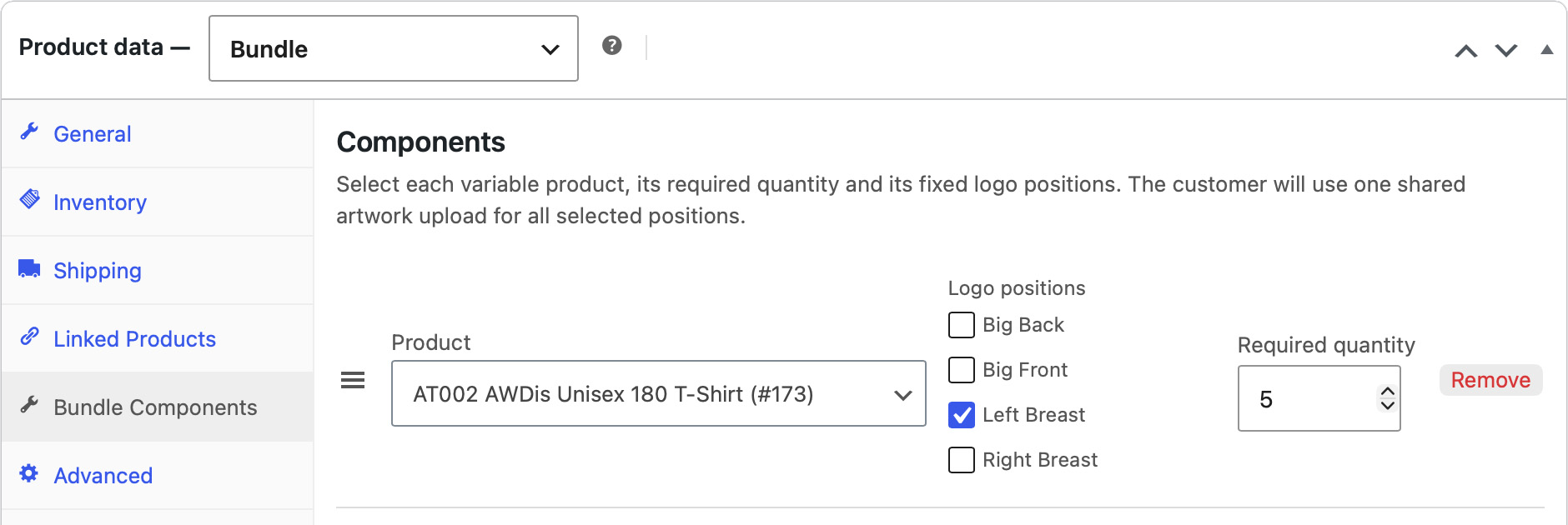
There’s even a custom bundle product type.
For example, Buzspoke can offer a fixed-price workwear bundle containing five T-shirts and two hoodies. Customers choose their preferred colours and sizes for each garment, upload their artwork and the plugin makes sure the correct quantities have been selected before allowing the bundle into the basket.
All the configuration details are carried through checkout and into the WooCommerce order, including access to the uploaded artwork.
Which makes life considerably easier for everyone.
Quantity discounts without another plugin
One of the requirements was to support bulk discounts across different variations of the same product.
So, if somebody orders 25 medium T-shirts and 26 large T-shirts, they should qualify for the discount available when purchasing 51 T-shirts.
Not two separate discounts based on quantities of 25 and 26.
The original plan was to integrate with their existing discount rules plugin, but during development we decided it made more sense to build the discount functionality directly into Product Configurator.
We can now configure discount tiers centrally, decide which product categories qualify and override those settings for individual products.
The plugin calculates discounts across all eligible variations of the same product, even when they’ve been added to the basket separately.
It also automatically generates discount tables on product pages and calculates the appropriate ‘From’ prices for products displayed throughout the shop.
One less plugin to install, configure, update and potentially fall out with WooCommerce at some point in the future.
Lovely!
While we’re here, let’s rebuild the website …
Sue and David were happy with the existing website design, so our original proposal was to retain it and concentrate on developing the new functionality.
But the more we worked with the website, the more obvious it became that the underlying theme and page builder were holding it back.
The website was running a premium WordPress theme with WPBakery. We’re not particularly fond of either, especially now that WordPress has such a capable native block editor.
So we went a little further than originally planned.
Actually, quite a lot further.
We completely rebuilt the website using the default WordPress Twenty Twenty-Five theme and block editor, retaining the design Sue and David already liked.
The result is a much faster website that’s considerably easier to maintain and no longer dependent on a heavyweight premium theme and page builder.
It also means Sue and David can edit their pages using WordPress’ own block editor rather than having to navigate WPBakery.
As we’ve mentioned in our recent article about WordPress themes, we really don’t see much reason to use premium themes these days.
And this project is another excellent example of why.
And then there was Stripe …
Another problem Sue and David had been struggling with was their Stripe account.
They’d been trying to get it approved since May 2025, without success.
It turned out that Stripe had registered their company as a Limited Liability Partnership (LLP) rather than a Limited Company (Ltd).
A relatively small detail, you might think, but rather important when you’re attempting to verify a company’s legal identity!
Once we’d identified the problem, we were able to get their Stripe account up and running.
After well over a year of frustration, that was a particularly satisfying result.
And not a line of PHP required!
A much better website for Buzspoke
We showed Sue and David the finished website and they were absolutely made up with how much easier everything was to use.
Which is always lovely to hear, particularly when you’ve spent so much time developing something specifically around how a client needs to work.
What started as a plugin development project ultimately delivered a complete website rebuild, a much simpler product catalogue, better ordering functionality, integrated bulk discounts and a working payment gateway.
All while keeping the design they liked in the first place.
Product Configurator is also built around standard WooCommerce functionality, supports High-Performance Order Storage (HPOS) and provides REST API support for managing logo positions and bundles.
Although it was originally developed for Buzspoke, we’ve designed the plugin so its functionality isn’t tied to their particular products. Colour and size attributes are optional, logo positions are configurable and different products can use different combinations of features.
That gives us a useful foundation for similar WooCommerce projects in the future.
For now, we’re just pleased to have given Sue and David a website that works the way they wanted it to.

Leave a Reply